Equine practice management

The practice system that files the visit for you.

Field Visit takes the whole barn call on your phone — vitals, SOAP note, photos, charges and the owner's signature — with no signal at all. Back in coverage it files itself, once: the note on the record, a draft invoice for the office, the photos, the signature, the appointment closed.

  • 14-day free trial, no card
  • Free data import
  • Every plan is the full product · Solo from $149/mo

Field Visit on the phone, as recorded on the demo practice. Silent.

What a day looks like

Six things a working equine practice does every day, and how VetPro does them.

Every picture below is a screenshot of the product as it ships, taken on our demo practice. Nothing is a mock-up.

01 · The barn call

Open Field Visit once with signal. Then forget about signal.

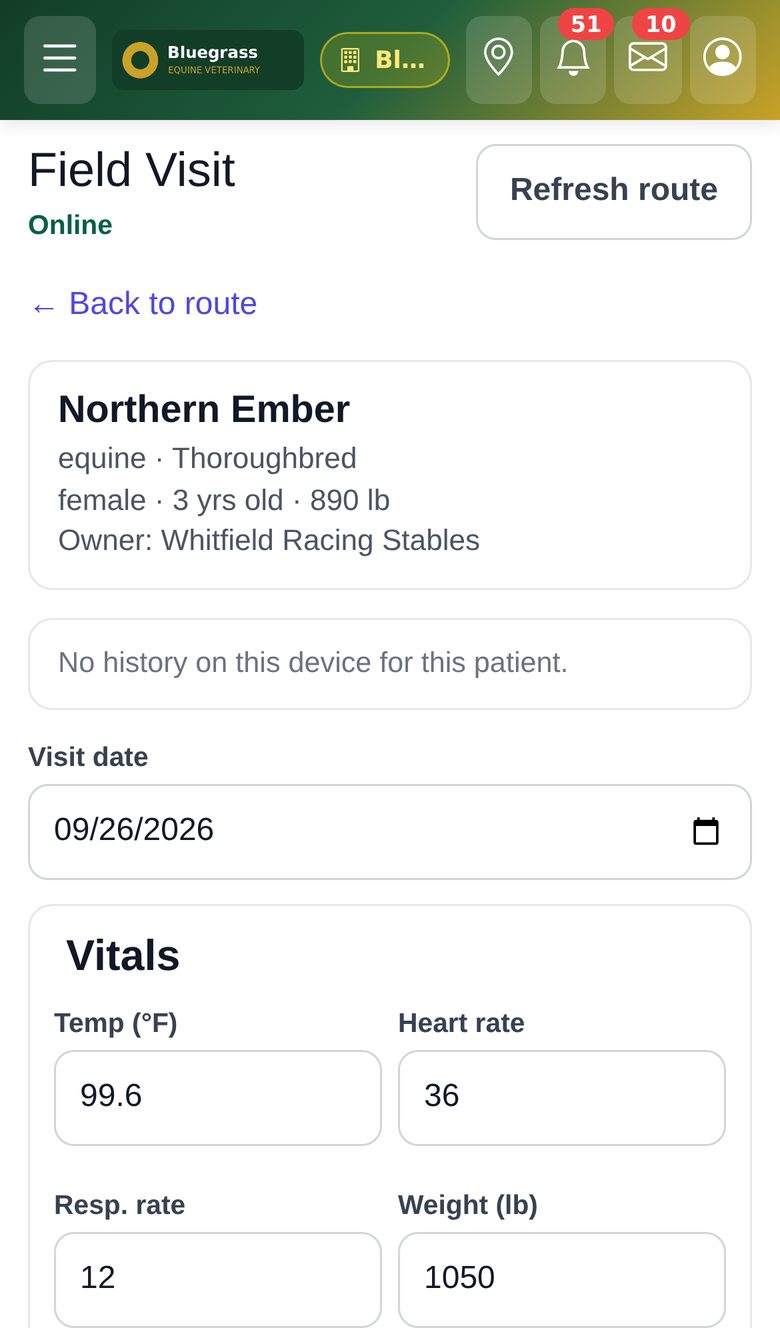
Before you head out, Field Visit loads today's route, each patient's summary, allergies and the owner's phone, plus your charge catalog, onto the phone.

See what it does
  • In the barn, with no coverage: tap the appointment, enter vitals and S/O/A/P, take photos, add charges, and have the owner sign on the screen. Tap Save visit.
  • When coverage returns the visit files itself, once: a SOAP note, a draft invoice for the office to review, the photos under the patient's documents, the signature, and the appointment marked completed.
  • The SOAP editor on any screen also survives a lost signal — the draft stays on the device and sends when you are back in range, even after you had to sign in again.
What still needs a connection: everything else — patients, the schedule, invoices, editing an already-filed note. We say that in the manual too.
Field Visit on an iPhone: a patient card for Northern Ember, a Thoroughbred mare, above the visit date and a Vitals form already holding temperature 99.6, heart rate 36, respiratory rate 12 and weight 1050 lb.
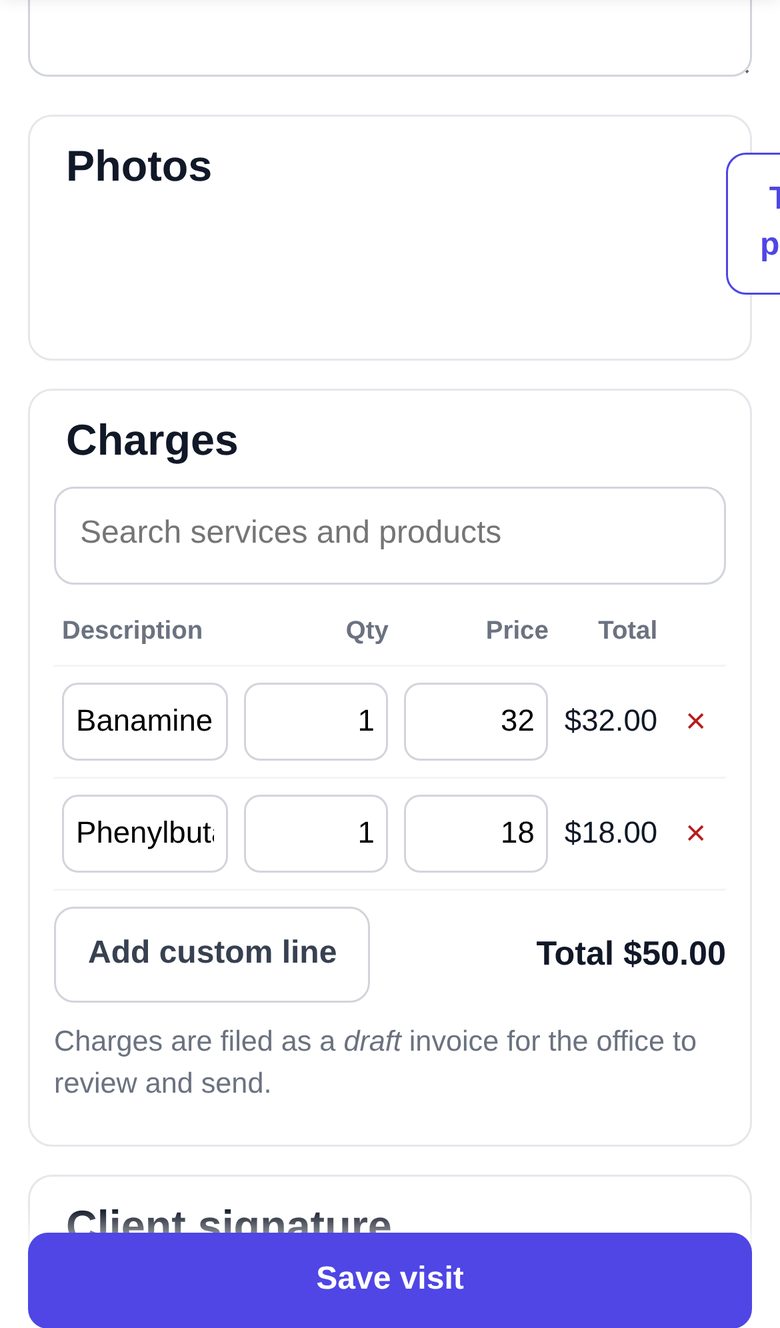
Further down the same Field Visit screen: the Photos card with a Take photo button, a Charges card with two lines, Banamine $32.00 and Phenylbutazone $18.00, a $50.00 total, a note that charges are filed as a draft invoice for the office to review, and the Save visit button pinned to the bottom of the screen.
02 · The record

Record the visit. The scribe drafts the note. You sign it.

The ambient scribe listens to the exam and drafts all four SOAP sections. Nothing is saved until the veterinarian has read, edited and signed — the audio is never kept, the signed note is the record.

See what it does
  • What happened? takes one spoken or typed sentence — "blocked PD nerves, four rads LF foot, Equioxx for seven days, recheck Tuesday" — and proposes the charges, prescriptions, lab orders and recheck for you to tick.
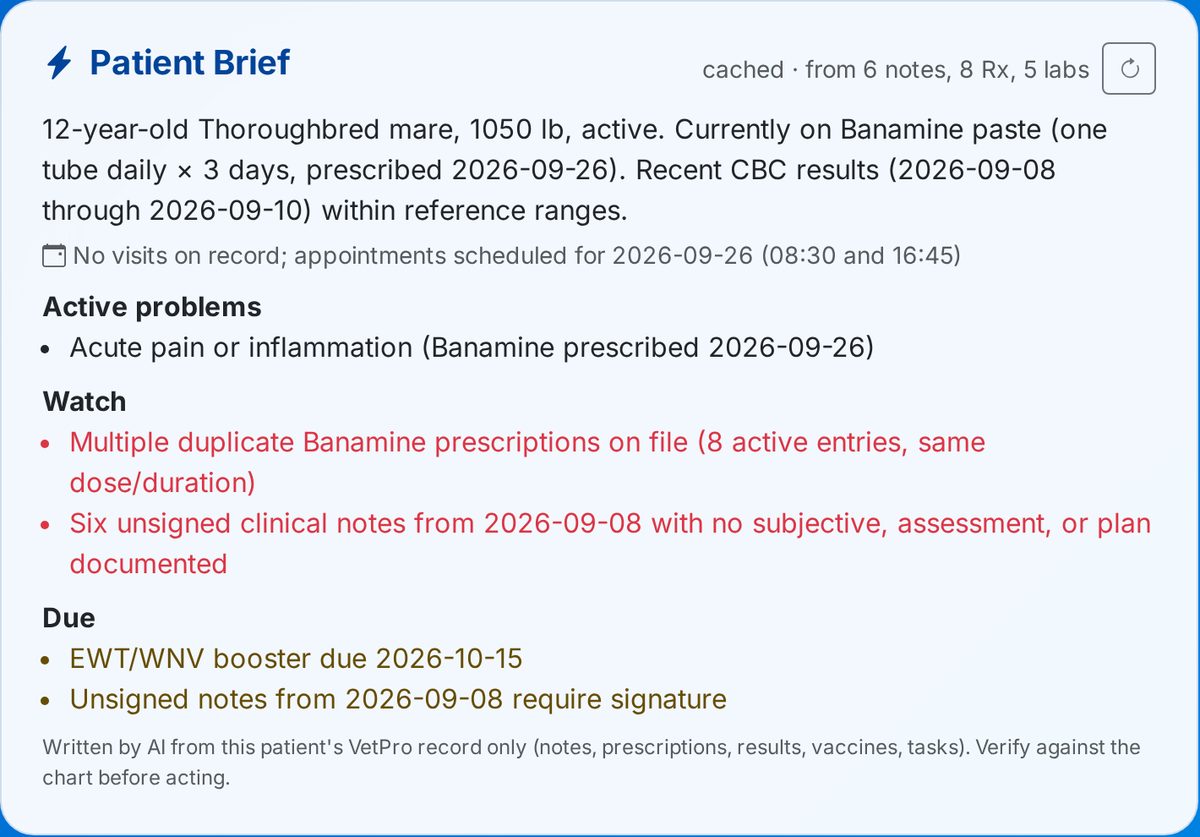
  • The Patient Brief at the top of every record says who the horse is, the active problems, what to watch and what is due — written from this patient's VetPro record only, never from outside knowledge.
  • A new prescription is checked against the patient's other active prescriptions and any known interaction is shown, with severity and management, before you save. Advisory, and only as complete as VetPro's interaction table.
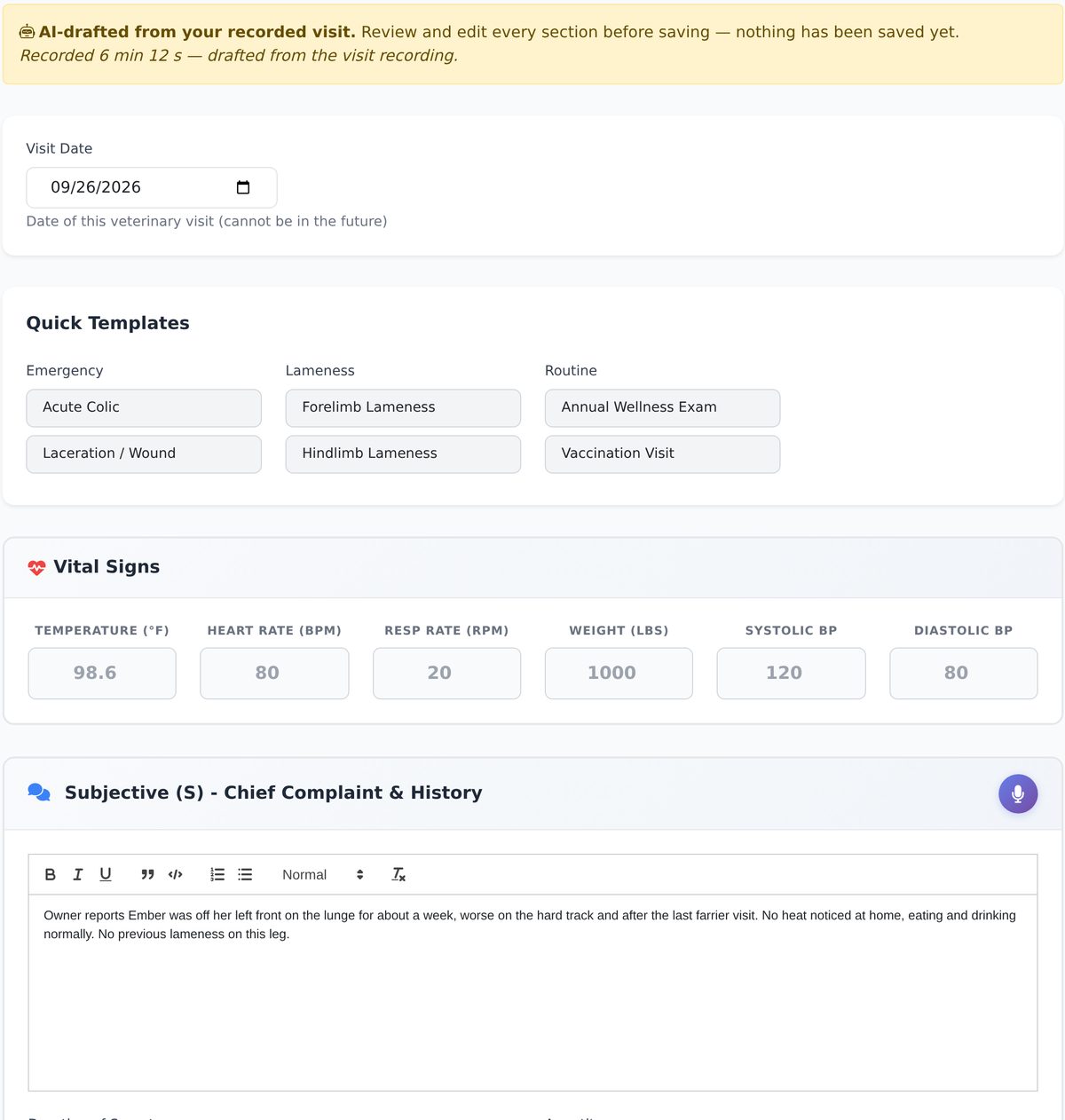
The SOAP editor with an amber banner reading 'AI-drafted from your recorded visit. Review and edit every section before saving — nothing has been saved yet', followed by the visit date, quick templates, vital signs and the Subjective section already filled with the drafted history.
A Patient Brief card: a 12-year-old Thoroughbred mare on Banamine, recent CBC within reference ranges, active problems, two items to watch flagged in red, and a due list including an EWT/WNV booster — with the footnote that it was written by AI from this patient's VetPro record only.
03 · The hospital

Every inpatient, what is due, and what was missed.

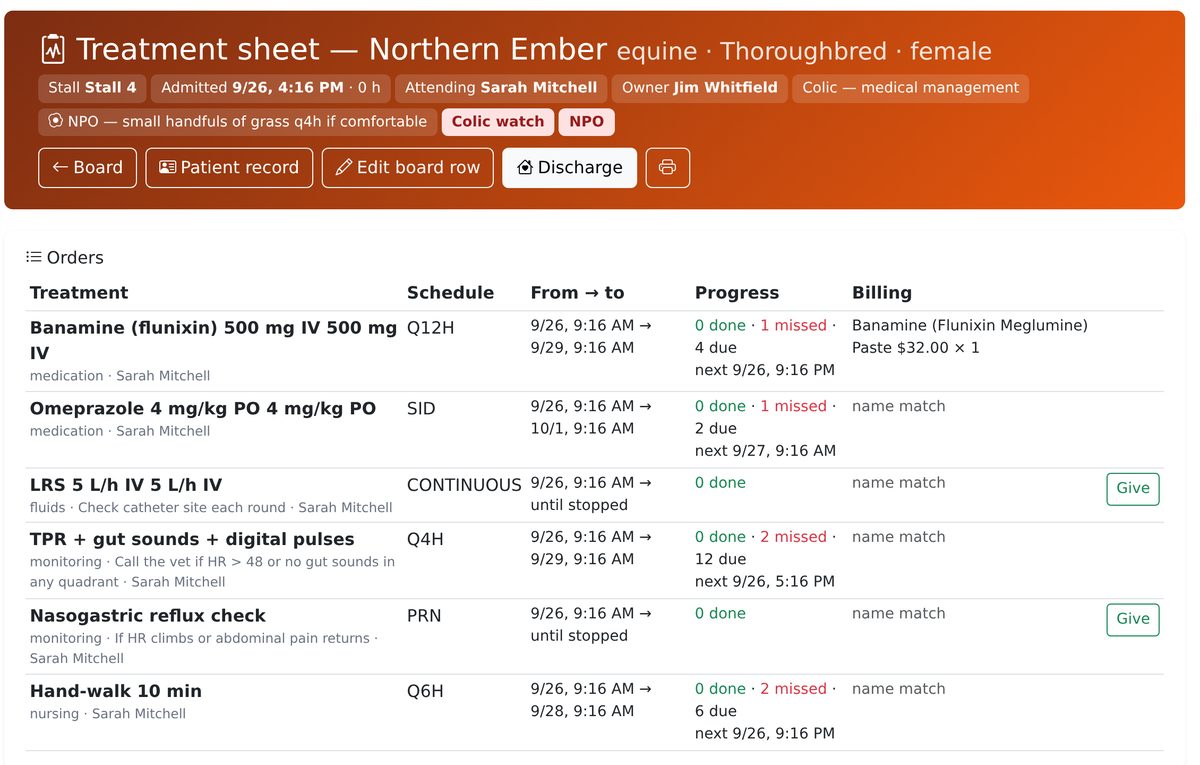
A vet admits the patient and writes the orders on the treatment sheet; VetPro schedules one slot per due time. Technicians mark each slot done or skipped with a reason, and a slot untouched for an hour is recorded as missed.

See what it does
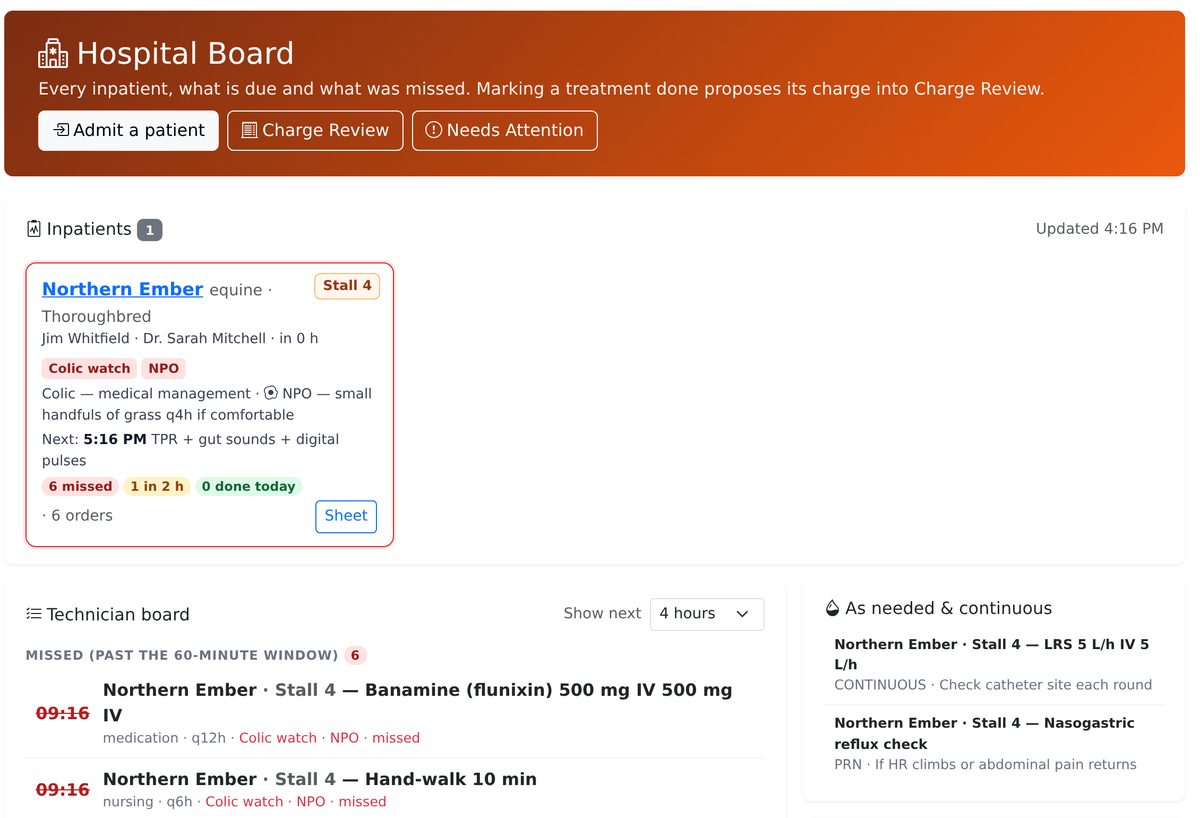
  • The Hospital Board shows stall, attending vet, alerts such as NPO or colic watch, diet, what is next and what was missed — with the technician board of every timed treatment below it.
  • Marking a treatment done proposes its charge into Charge Review, so the bill follows the care.
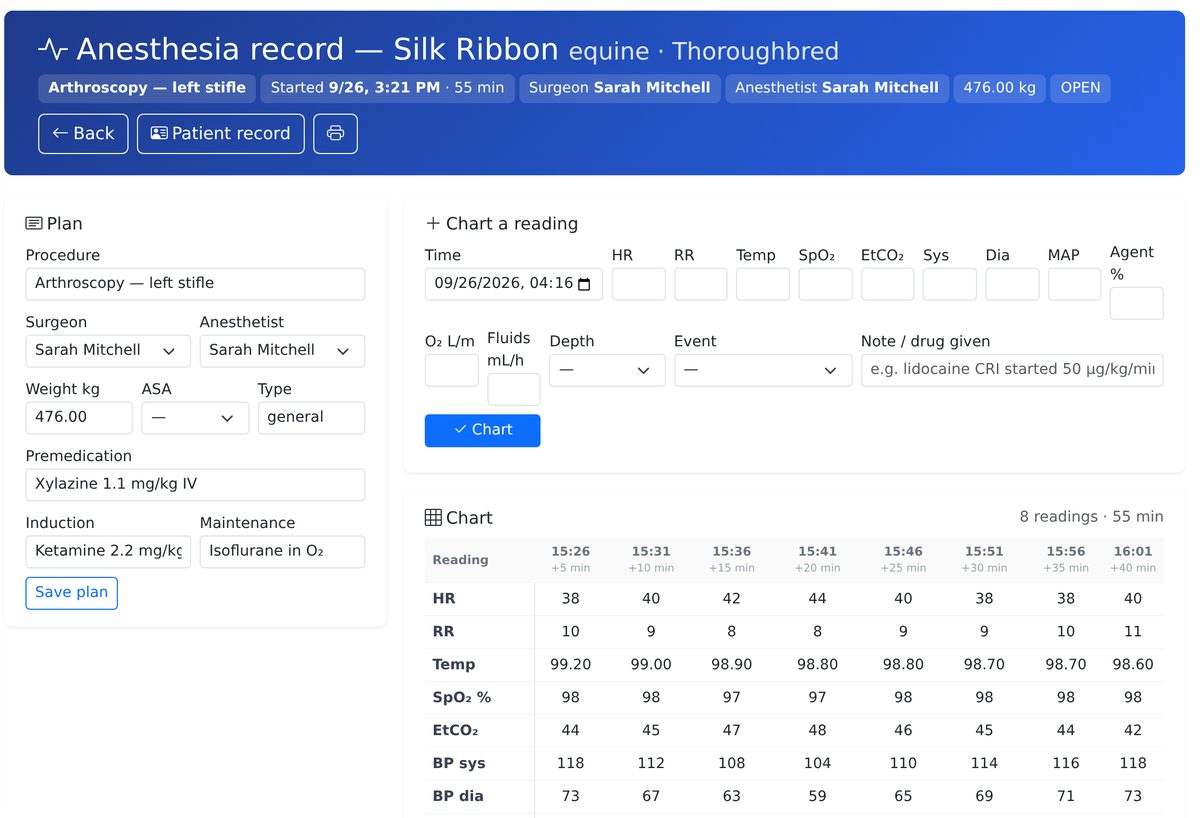
  • The anesthesia record charts readings against the clock — HR, RR, temperature, SpO₂, EtCO₂, blood pressure, agent, fluids — and prints.
The Hospital Board: one inpatient card for Northern Ember in Stall 4 with Colic watch and NPO alerts, the next treatment time, counts of missed and upcoming slots, and beneath it the technician board listing missed treatments first and the as-needed and continuous orders on the right.
A treatment sheet for Northern Ember: orders for Banamine every 12 hours, omeprazole once daily, LRS fluids continuous, TPR every 4 hours, a PRN reflux check and hand-walking every 6 hours, each with its schedule, date range, progress and billing item.
An anesthesia record for an arthroscopy: the plan with premedication, induction and maintenance agents on the left, a form to chart a new reading, and a chart of eight readings at five-minute intervals showing heart rate, respiratory rate, temperature, SpO₂, EtCO₂ and blood pressure.
04 · The front desk

Clients book, pay and text you without a phone call.

The client portal runs on every plan. Staff invite a client in one click; the client books against the hours you set, pays open invoices by card, signs forms, and reads their horse's records.

See what it does
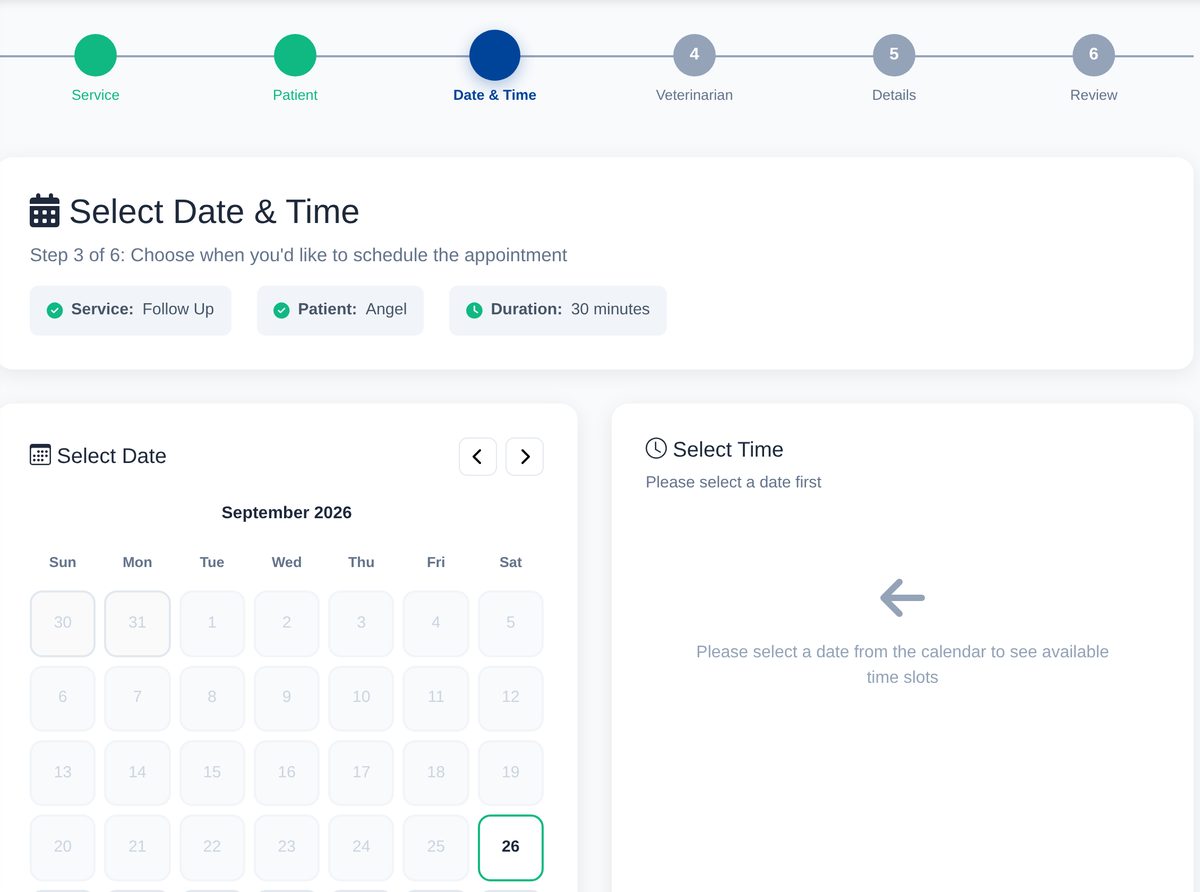
  • Online booking in six steps against per-vet booking hours, with conflict checks and email confirmation. Clients can cancel or reschedule themselves up to 24 hours out.
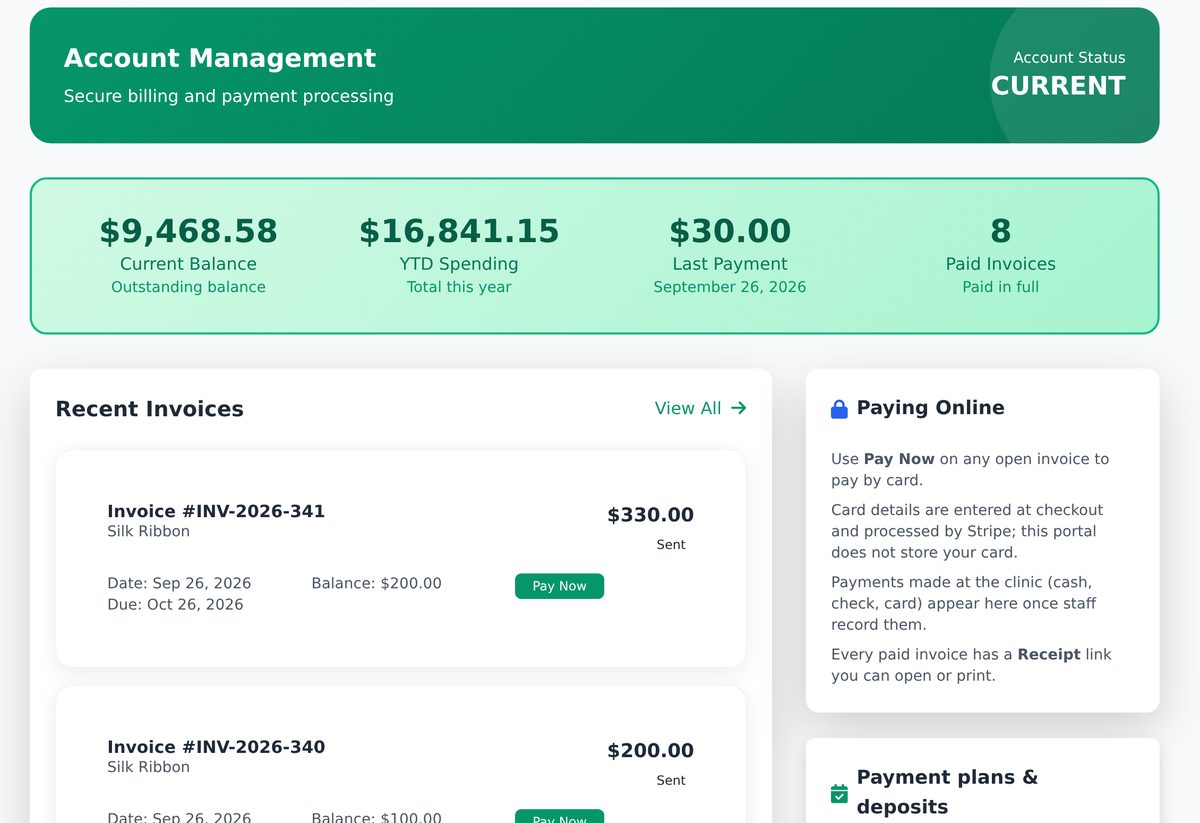
  • Pay Now on any open invoice, or a text-to-pay link that needs no login. Card details go to Stripe, never to VetPro; money settles to the practice's own account.
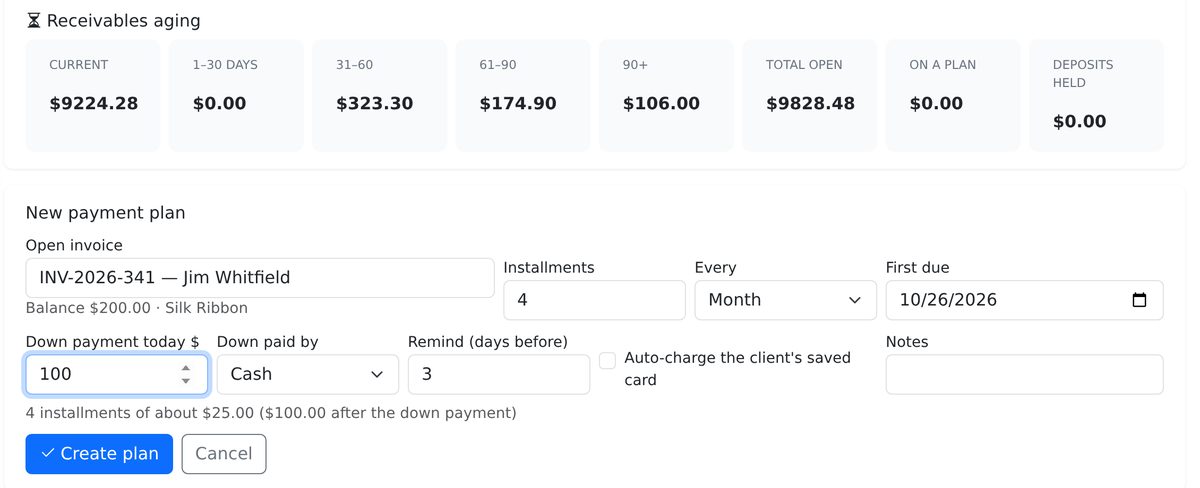
  • Deposits and payment plans — 2 to 24 installments, an optional down payment, reminders with a pay link, and auto-charge of a card the client saved in the portal.
  • Two-way texting from a practice number: a client's reply lands on their timeline and in the Texts inbox; staff answer in the thread. Consent is enforced and STOP is always honoured.
The client portal booking wizard at step 3 of 6, Date and Time: the chosen service and patient are confirmed above a September calendar with today highlighted, and a panel asking the client to pick a date to see available time slots.
The client portal Billing page: an account summary with current balance and paid invoices, a recent invoice with a green Pay Now button, and a 'Paying Online' panel explaining that card details are entered at Stripe checkout and every paid invoice has a receipt link.
The New payment plan form on the practice's Plans and Deposits page: an open invoice selected, four monthly installments, first due date, a $100 down payment paid by cash, reminders three days before, and a checkbox to auto-charge the client's saved card.
05 · Unbilled work

It proposes. A person approves. Nothing slips off the desk unseen.

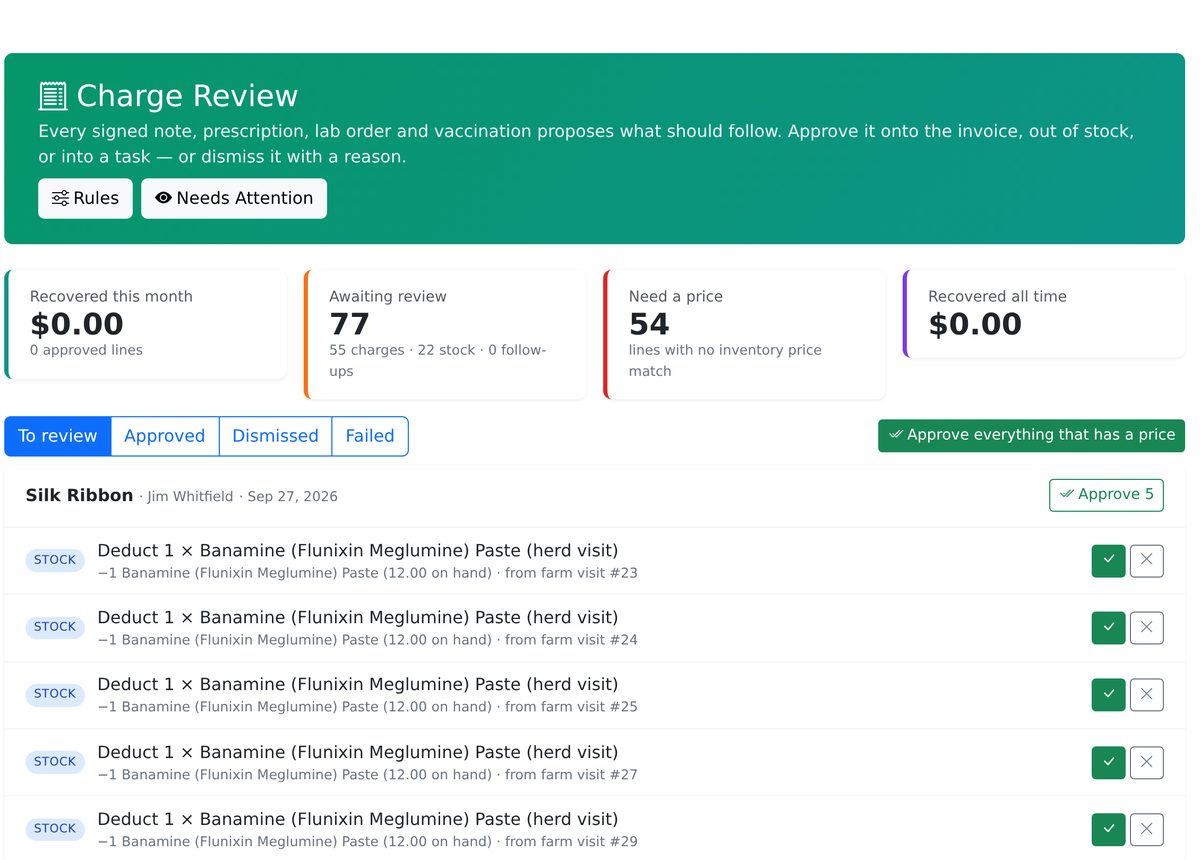
Signing a note, writing a prescription, ordering a lab test or recording a vaccination creates a proposal: an invoice line priced from inventory, a stock deduction, a recheck task. Charge Review is where someone approves or dismisses each one with a reason.

See what it does
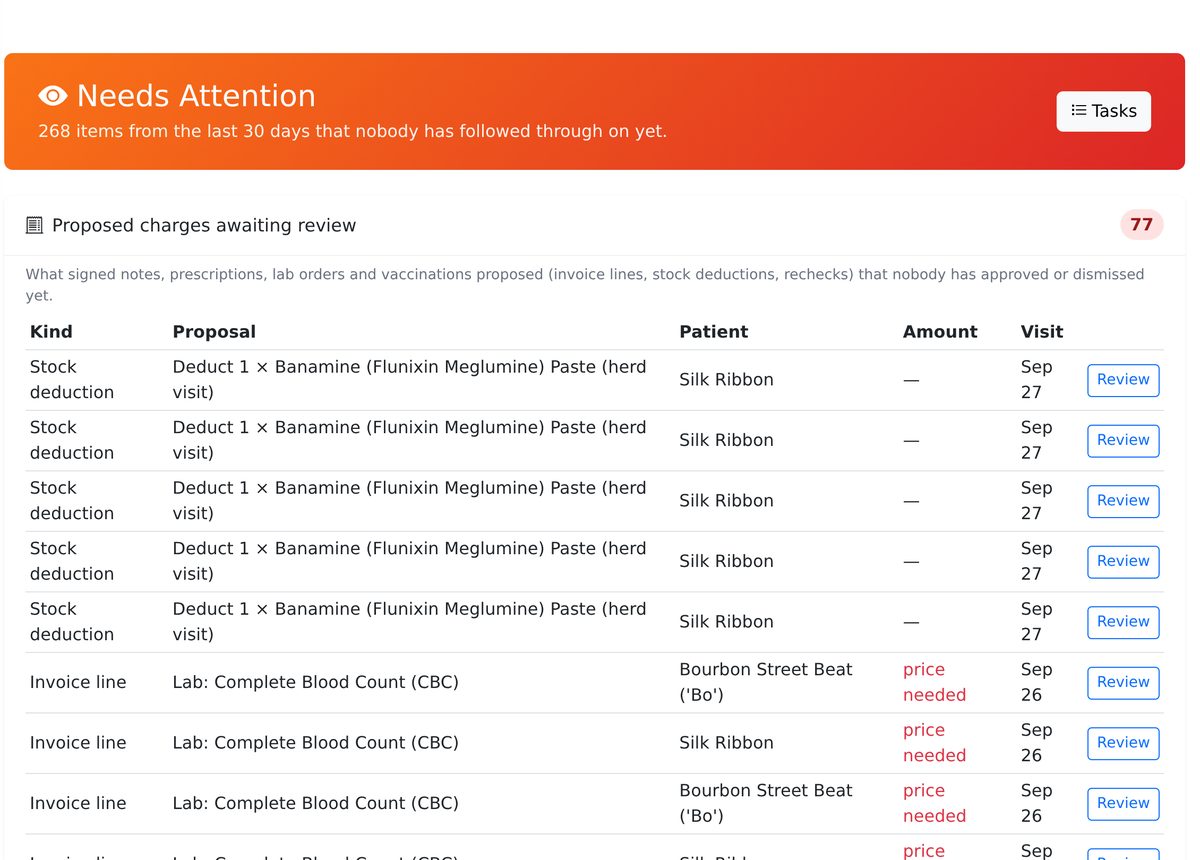
  • Needs Attention lists the last 30 days of loose ends: unsigned notes, abnormal lab values nobody has acknowledged, completed visits and dispensed drugs with no invoice, draft invoices — each with a button to the screen that fixes it.
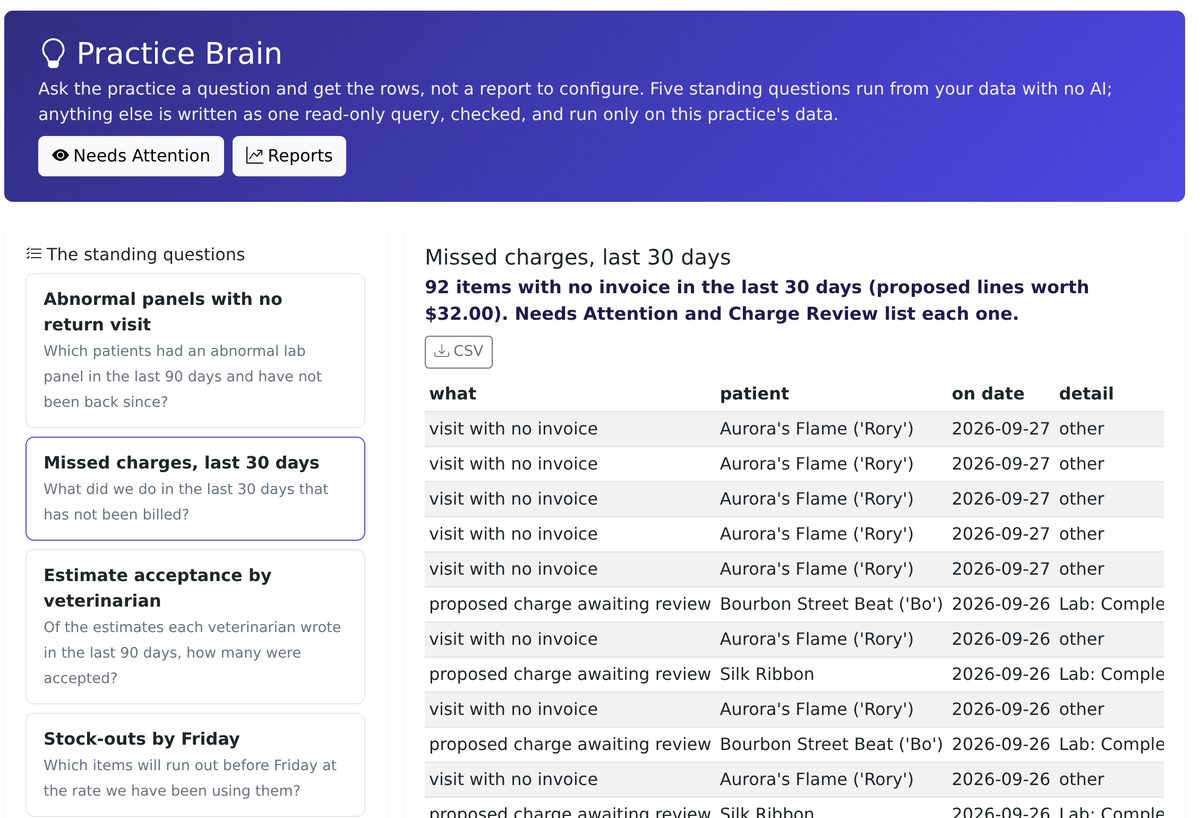
  • Practice Brain answers five standing questions from your data with no AI — missed charges, abnormal panels with no return visit, stock-outs by Friday, estimate acceptance by vet, overdue Coggins — and takes a plain-language question for anything else, as one checked, read-only query on your practice only.
  • Rules live in one place: each proposal type can be switched off, or set to auto-approve when it already has a price.
Honest limit: VetPro catches unbilled work for review by matching visits and invoices on the patient and the day, so a visit billed on a different day still shows up until someone clears it. It does not promise that every charge is caught.
Charge Review: summary cards for recovered this month, 77 charges awaiting review and 54 lines that need a price, tabs for To review, Approved, Dismissed and Failed, and a list of proposed stock deductions for a patient with green approve and grey dismiss buttons on each row.
Needs Attention: a red header counting 262 items from the last 30 days nobody has followed through on, and a table of proposed charges awaiting review showing kind, proposal, patient, amount, visit date and a Review button per row.
Practice Brain with the standing question 'Missed charges, last 30 days' selected: a one-line reading that 92 items have no invoice, a CSV button, and a table of visits with no invoice and proposed charges awaiting review by patient and date.
06 · Switching

Bring your records. Validate everything. Undo anything.

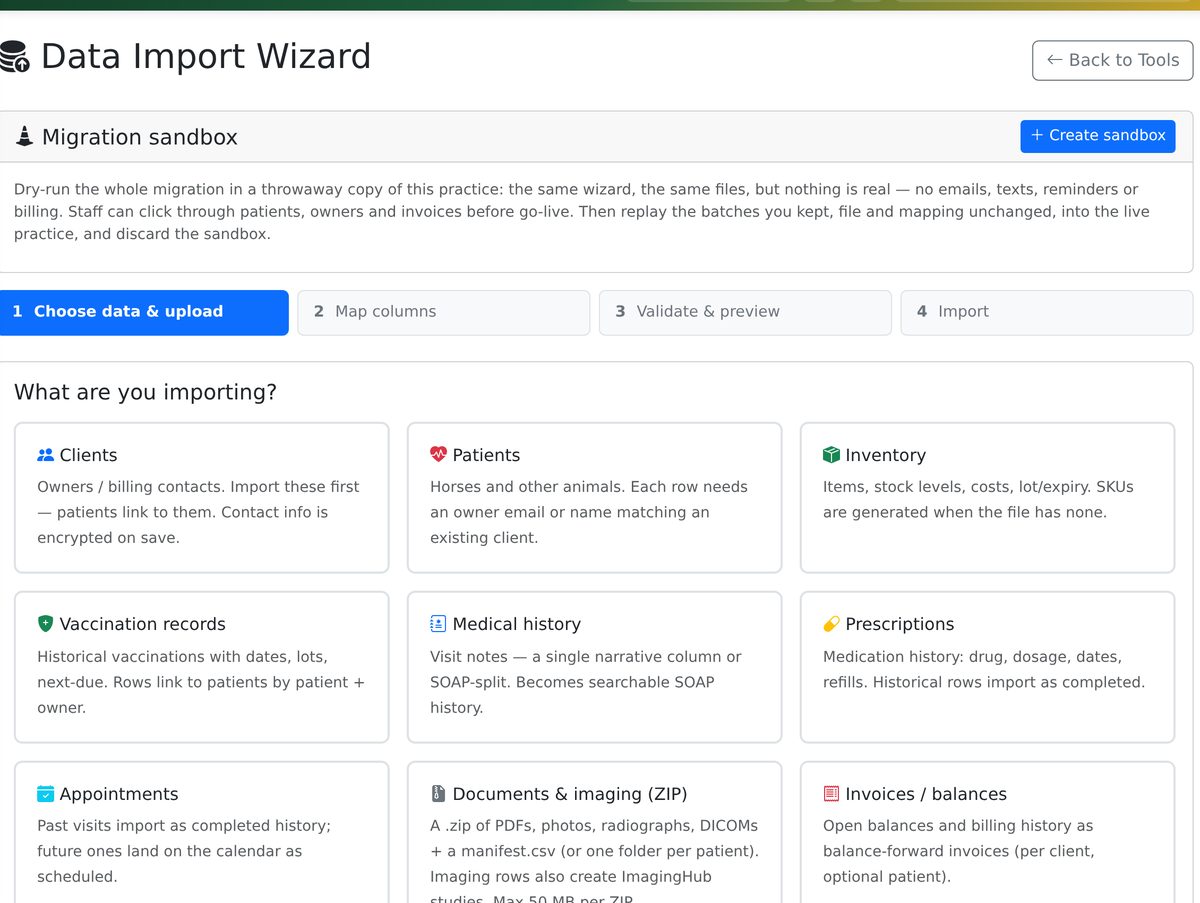
The Data Import Wizard takes the export from your current system — AVImark, Cornerstone, HVMS, ImproMed, Pulse, DVMAX or any spreadsheet — with exact export instructions for each.

See what it does
  • AI-assisted column mapping, then full validation before anything is written: every row is checked and previewed first, and the rows that will not load say why.
  • A migration sandbox — a throwaway copy of your practice to import into and click through with the real files, then replay the batches you kept into the live practice.
  • Every import commits as one transaction and has one-click undo. Reconcile and sign off on the totals beside your old system's numbers.
  • Your data is always exportable: per-record CSVs that re-import directly, a documents ZIP, or one everything-bundle. No lock-in is a stated commitment, and it is real in the product.
The Data Import Wizard: a Migration sandbox panel with a Create sandbox button, the four steps Choose data and upload, Map columns, Validate and preview, Import, and a grid of record types to import — clients, patients, inventory, vaccination records, medical history, prescriptions, appointments, documents and imaging, invoices and balances.
Also in the box

The rest of the practice, on every plan.

Solo is not a lite edition. The list below is in every tier; you pay more only for more veterinarians, more locations, breeding, branding and AR imaging.

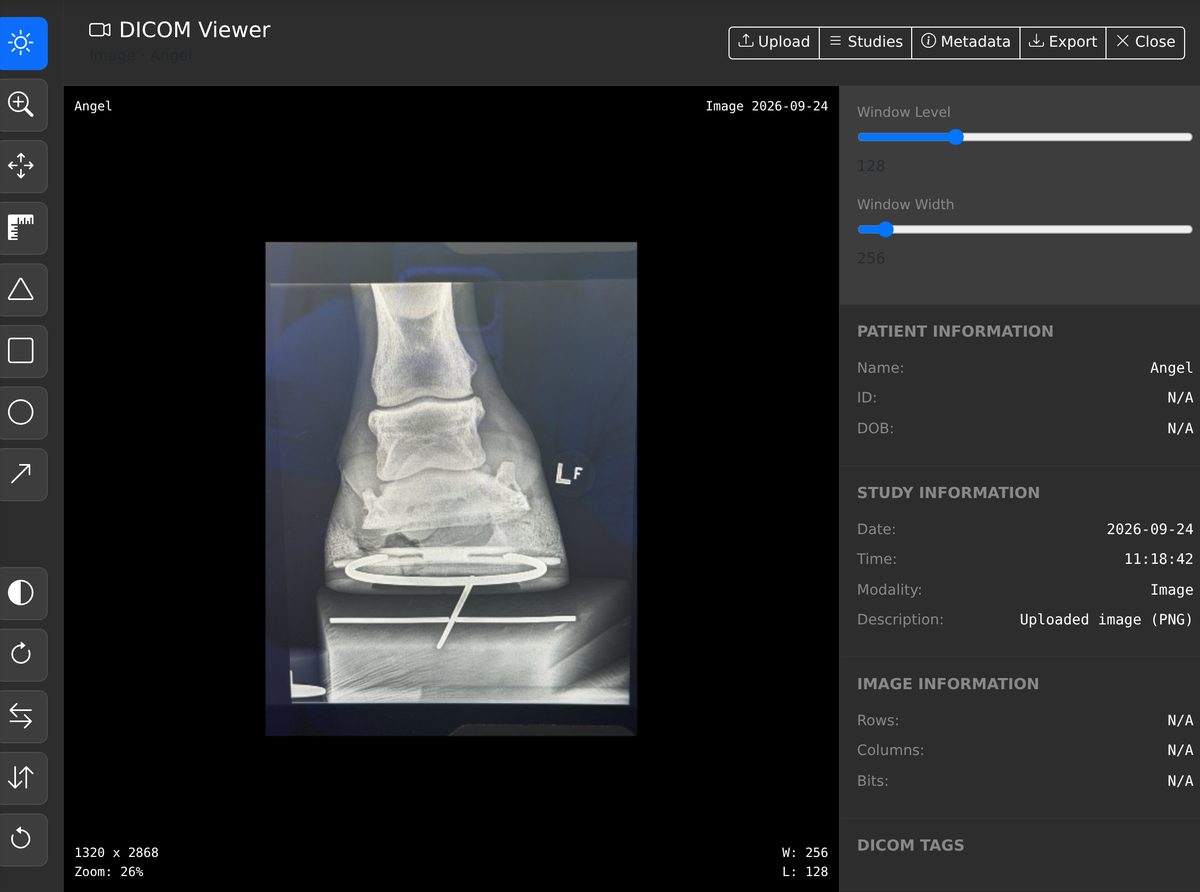
The built-in DICOM viewer showing a lateral radiograph of a horse's foot with window level and width sliders, measurement and annotation tools down the left, and patient, study and image information on the right.
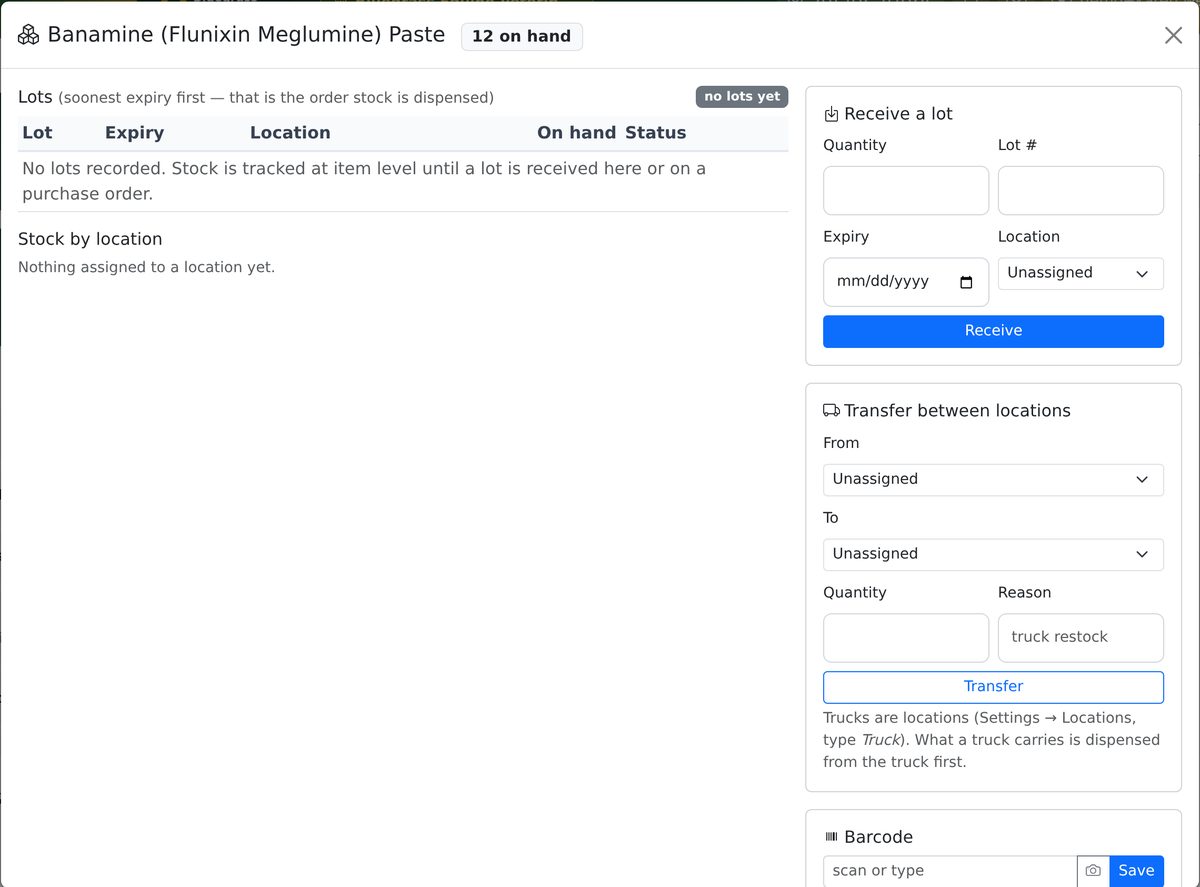
An inventory item's Lots and locations window: a lots table sorted soonest expiry first, stock by location, a Receive a lot form with quantity, lot number, expiry and location, a Transfer between locations form with a note that trucks are locations, and a barcode field.
See all nine
  • Inventory with lots, expiry and barcodes

    Receive lots, dispense soonest-expiry first, see stock per location including each truck, transfer onto the truck, and find an item by scanning or typing its barcode, SKU or lot number.

  • Controlled-substance logbook

    Every controlled prescription is logged automatically to an append-only log with a running balance per item; counts and wastes need a witness; export to Excel for inspections.

  • Certificates

    EIA test records (the VS 10-11 fields) and Certificates of Veterinary Inspection, prefilled from the record and signed on screen by the veterinarian. The laboratory issues the Coggins result; this is the practice's signed record of it.

  • Lab results and trends

    Order in VetPro, print or email the requisition, record the returned values, and numeric results build multi-year trend charts. Manual entry today; IDEXX, Antech and Zoetis connectors are built and activate per practice with the lab.

  • Voice commands and dictation patent pending

    Navigate by page name, look up a patient, read today's schedule, dictate into any SOAP section, and chart from one spoken sentence. On iPhone it is push-to-talk; the hands-free wake word is desktop and Android Chrome.

  • DICOM viewer and image studies

    Upload DICOM files or plain images — a JPEG from a portable DR unit, a referral attachment, a phone photo — and read them in the built-in viewer with measurement tools. Files are uploaded; there is no PACS network pull.

  • Forms and consents with e-signature

    Intake, treatment, anesthesia and euthanasia consents and financial agreements, sent as a one-time link by email or text, or signed on the tablet you hand over. The signed PDF is filed with a tamper-evident hash.

  • Herd visits and the race-date calculator

    One stop, every animal from any owner, one draft invoice per owner with the trip fee split the way you choose. Withdrawal-time calculations per medication, and HISA-ready record submission that activates when HISA issues credentials.

  • REST API, webhooks and MCP

    A documented API with scoped keys, signed webhook events, and an MCP server so an AI assistant can read the schedule, a record or the hospital board with the practice's permission — on every plan, including Solo.

Pricing

Solo is the full product. You upgrade for the shape of your practice, not for features.

One veterinarian

SoloFull product

$149/month

The full clinical and business product for a solo practice. Unlimited staff and patients.

Start your free trial
Multi-vet practice

Complete

$249/month
+ $129 per additional vet

Adds veterinarians, multiple locations with per-site reporting, and breeding management.

Start your free trial
Networks and groups

Enterprise

$499/month
+ $129 per additional vet

No cap on veterinarians ($129/mo each after the first), your own branding across the portals, AR imaging and 500 GB.

Start your free trial
Every plan: unlimited staff · 14-day free trial · no card · free data import · month-to-month, cancel anytime See the full feature matrix →
What happens next

From sign-up to the first barn call.

Start the trial

Create the practice in a few minutes — no card. Add your veterinarians and staff; every plan has unlimited staff seats. Two-factor and role permissions are set per practice.

Import your records

Export from your current system with our per-vendor instructions, dry-run the migration in the sandbox, then commit for real. Free for every trial that converts, and undoable either way.

Make the first barn call

Install VetPro on the phone from the browser, open Field Visit once with signal, and drive. The visit files itself when you are back in coverage.

Try it on your next farm call, not on a sales call.

Fourteen days, the whole product, no card. If it does not earn its place on the truck, export everything and walk away.